The Ultimate Guide to Inventory Management Software for Small Manufacturing

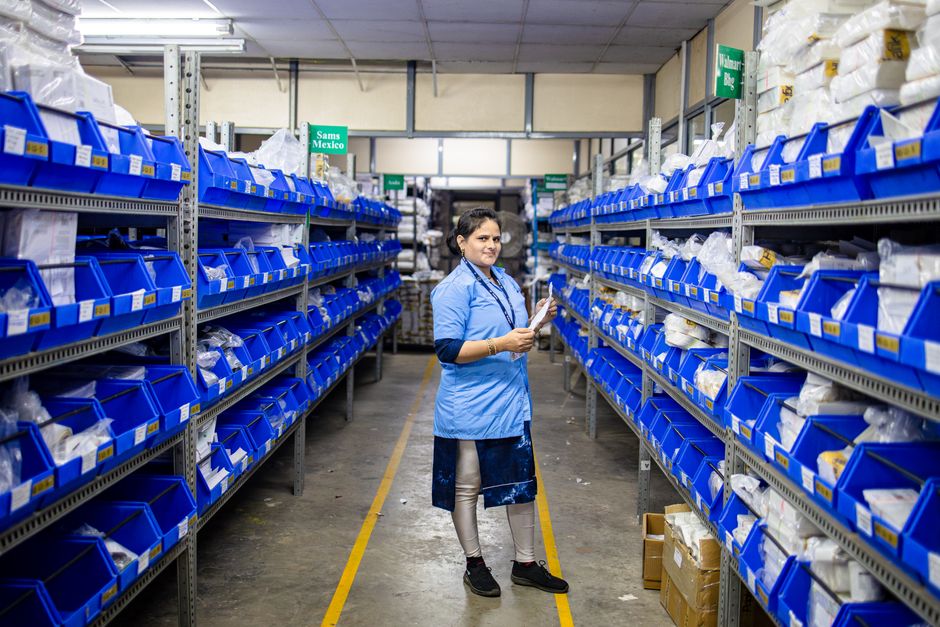
Picture this: You’re a small manufacturing business owner who just landed your biggest order yet. The excitement is real—this could be the turning point for your company. But then reality hits. You check your raw materials inventory and realize you’re short on a critical component. You check production schedules and discover you don’t have the capacity to meet the deadline. You check finished goods and find discrepancies between what your system says you have and what’s actually on the shelves. Suddenly, that dream order feels more like a nightmare.
If this scenario sounds familiar, you’re not alone. Small manufacturing businesses face unique inventory challenges that can make or break their success. That’s where inventory management software for small manufacturing comes in—not as just another tool, but as the central nervous system that keeps your operations running smoothly. This comprehensive guide will walk you through everything you need to know to choose, implement, and optimize the right inventory solution for your manufacturing business.
Key Takeaways
- Inventory software reduces stockouts by 40-80% while cutting holding costs by 15-30% through better demand forecasting and reorder point optimization
- The right system should handle raw materials, work-in-progress, and finished goods tracking—all three phases of manufacturing inventory
- Integration with your existing tools (accounting, CRM, e-commerce) is non-negotiable for avoiding data silos and manual entry errors
- Mobile accessibility isn’t just convenient—it’s essential for real-time inventory updates from the production floor, warehouse, and shipping areas
- Manufacturing-specific features like bill of materials (BOM) management, lot tracking, and serial number tracking separate basic inventory systems from manufacturing-ready ones
- Implementation success depends more on process standardization and team training than on software features alone
- Scalability matters—choose a system that can grow with your business without requiring a complete overhaul in 2-3 years
Why Small Manufacturers Need Specialized Inventory Software
You might wonder if you can get by with spreadsheets or basic inventory tracking. For very simple operations with just a handful of products, maybe. But once you’re dealing with multiple components, assembly processes, and customer-specific configurations, spreadsheets become a recipe for disaster. Let’s break down why specialized software isn’t just nice to have—it’s essential.






The Three-Layer Inventory Challenge
Manufacturing inventory is fundamentally different from retail or distribution inventory. You’re not just tracking finished products sitting on shelves waiting to be sold. You’re managing a three-layer system:
- Raw materials: The components and materials you purchase to begin production
- Work-in-progress (WIP): Products that are partially completed on the production floor
- Finished goods: Completed products ready for shipment to customers
Each layer has its own tracking requirements, valuation methods, and management challenges. Basic inventory systems often collapse these layers into a single “inventory” category, which leads to critical blind spots. A proper manufacturing inventory management system handles all three layers seamlessly.
The Real Cost of Inventory Errors
Let’s talk numbers. For small manufacturers, inventory errors aren’t just annoying—they’re expensive. Consider these common scenarios:
- Stockouts of critical components halt production lines, leading to missed deadlines and rush shipping costs
- Overstocking ties up cash in materials that might become obsolete or require expensive storage
- Shrinkage (theft, damage, or misplacement) goes undetected until it’s too late to prevent or investigate
- Incorrect inventory counts lead to promising products you can’t actually deliver, damaging customer trust
According to industry studies, manufacturers using dedicated inventory management software typically see a 40-80% reduction in stockouts and a 15-30% decrease in inventory holding costs. That’s not just efficiency—that’s directly impacting your bottom line.
Editorial Insight: “Many small manufacturers underestimate how much time they’re wasting on manual inventory tracking. When we analyze businesses before and after implementing proper systems, we consistently find 10-15 hours per week regained for productive work. More importantly, the data accuracy improvements lead to better decision-making across the entire operation.” — Manufacturing Operations Consultant
Essential Features Your Inventory Software Must Have
Not all inventory management systems are created equal, especially when it comes to manufacturing. Here are the features that separate basic systems from manufacturing-ready solutions.
Manufacturing-Specific Capabilities
These aren’t just “nice-to-have” features—they’re the core functionality that makes a system suitable for manufacturing:
- Bill of Materials (BOM) Management: The ability to create, store, and update BOMs for your products. This should include multiple levels (subassemblies), alternative components, and revision tracking.
- Lot and Serial Number Tracking: Critical for quality control, recalls, and warranty management. You need to track which batches of materials went into which finished products.
- Work Order Integration: The system should generate production orders that automatically consume raw materials and create finished goods inventory when completed.
- Production Scheduling: Visibility into when materials will be consumed and when finished products will be available based on your production capacity.
- Quality Control Tracking: The ability to record inspections, tests, and quality issues at various stages of production.
Core Inventory Management Features
Beyond manufacturing-specific features, your system needs robust inventory fundamentals:
- Real-time Tracking: Instant updates when materials are received, moved, consumed, or shipped
- Multi-location Management: Track inventory across warehouses, production areas, and even remote storage
- Automated Reordering: Set minimum stock levels and have the system generate purchase orders automatically
- Cycle Counting: Scheduled partial counts that keep your inventory accurate without shutting down operations
- Inventory Valuation: Support for FIFO, LIFO, and weighted average costing methods
Integration and Accessibility
The best inventory system is useless if it doesn’t work with your other tools or if your team can’t use it effectively:
- Accounting Software Integration: Seamless sync with QuickBooks, Xero, or other accounting systems
- E-commerce and CRM Connections: Automatic updates when sales are made through your website or CRM
- Mobile Accessibility: Tablet and smartphone access for receiving, picking, and counting on the go
- Barcode/RFID Scanning: Support for hardware that speeds up data entry and reduces errors
Comparing Top Inventory Management Solutions for Small Manufacturers
| Name | Best For | Key Manufacturing Features | Price Range | Limitation |
|---|---|---|---|---|
| Katana MRP | Small to mid-sized manufacturers with complex BOMs | Visual production scheduling, real-time inventory updates, shop floor app | $99-$499/month | Limited accounting integration depth |
| Fishbowl Manufacturing | Established manufacturers needing deep QuickBooks integration | Advanced BOM management, work orders, asset tracking | $4,395 one-time + $999/year | Steeper learning curve, on-premise installation |
| Zoho Inventory | Manufacturers with strong e-commerce presence | Multi-channel sales integration, drop shipping, serial tracking | $29-$249/month | Manufacturing features require add-ons |
| MRPeasy | Small shops needing affordable, complete MRP | Full MRP functionality, purchase management, production planning | $49-$199/month | User interface less polished than competitors |
| Cin7 Core | Growing manufacturers with complex inventory needs | Omnichannel inventory, advanced reporting, warehouse management | $299-$799/month | Higher price point for small businesses |
Deep Dive: Two Popular Options for Small Manufacturing
Katana MRP: The Visual Production Platform
Katana has carved out a strong position by making complex manufacturing concepts visually intuitive. Their drag-and-drop production scheduling gives you an immediate overview of what’s happening on your shop floor, while real-time inventory updates ensure your material availability always matches your production plans. The mobile app for shop floor workers is particularly well-designed—it’s simple enough for daily use but captures all the necessary data. Where Katana sometimes falls short is in deep financial integration; while it connects to QuickBooks and Xero, manufacturers with complex costing requirements might find the accounting features somewhat basic. It’s an excellent choice if your priority is production visibility and ease of use.
Fishbowl Manufacturing: The Power User’s Choice
Fishbowl takes a different approach—it’s a comprehensive, on-premise solution that integrates deeply with QuickBooks (it’s actually QuickBooks’ recommended manufacturing solution). This makes it powerful for manufacturers who live in QuickBooks for their financial management. The BOM management is exceptionally detailed, supporting unlimited levels and complex configurations. However, this power comes with complexity. The learning curve is steeper than cloud-based alternatives, and the upfront cost is significant. You’re also responsible for maintaining the server infrastructure. Fishbowl is best for established manufacturers who need industrial-strength features and have the technical resources to support an on-premise system.
Common Pitfalls When Choosing Inventory Management Software
- Overbuying features you’ll never use: It’s tempting to choose the system with the longest feature list, but every extra feature adds complexity, training time, and potential confusion. Focus on what you actually need today and in the next 12-18 months.
- Underestimating implementation time: Even the best software requires data migration, process adjustment, and team training. Budget 2-3 months for full implementation, not 2-3 weeks.
- Ignoring mobile accessibility: If your team can’t update inventory from the production floor or warehouse, you’ll either have delays or people will revert to paper notes that eventually get entered (or lost).
- Skipping the integration check: Before committing, verify exactly how the system connects to your accounting software, e-commerce platform, and other critical tools. “Has an integration” often means “has a basic API” not “seamlessly syncs all data.”
- Choosing based on price alone: The cheapest system that meets your needs might save money upfront but cost more in inefficiency, errors, and eventually replacement. The most expensive system might have features you’ll never use. Focus on value, not just cost.
- Not planning for growth: Choose a system that can scale with you. Switching inventory systems is painful and expensive—better to pay a little more now for room to grow.
Frequently Asked Questions
What’s the difference between inventory software and manufacturing ERP?
Think of inventory management software as a specialized tool focused specifically on tracking and managing your materials and products. Manufacturing ERP (Enterprise Resource Planning) is a broader system that includes inventory management but also handles accounting, human resources, customer relationships, and other business functions. For many small manufacturers, starting with dedicated inventory management software for small manufacturing makes sense—it solves your most pressing problems without the complexity and cost of a full ERP. As you grow, you can either add modules to your inventory system or migrate to a comprehensive ERP.
How much does manufacturing inventory software typically cost?
Pricing varies widely based on features, deployment method (cloud vs. on-premise), and number of users. Cloud-based systems typically range from $50-$800 per month, with most small manufacturers finding suitable options in the $100-$300/month range. On-premise solutions like Fishbowl have higher upfront costs ($3,000-$10,000) plus annual maintenance fees. Don’t forget to factor in implementation costs (consulting, data migration), training, and any required hardware (barcode scanners, tablets). A good rule of thumb: budget 1-2% of your annual revenue for inventory management technology.
Can I use inventory software if I make custom or configure-to-order products?
Absolutely—in fact, custom manufacturers often benefit the most from proper inventory management. Look for systems with strong BOM management that allows for variable components, optional features, and customer-specific configurations. The key is finding software that lets you create templates for common configurations while still accommodating unique customer requests. Systems with good sales order to work order conversion are particularly valuable for custom manufacturers, as they ensure materials are allocated to specific customer orders rather than just general inventory.
How long does implementation typically take?
For a small manufacturing business, plan on 4-12 weeks from signing to full operation. The timeline depends on several factors: the complexity of your products and BOMs, how much historical data you’re migrating, how many locations you have, and how standardized your current processes are. The actual software setup might only take a week or two, but process refinement, data cleaning, and team training take additional time. A phased approach often works best—start with raw materials tracking, then add work-in-progress, then finished goods, rather than trying to do everything at once.
What’s the biggest mistake manufacturers make when implementing new software?
Treating it as just a technology change rather than a process improvement. The software will expose how inconsistent your current processes are—if three people receive materials three different ways, the software can’t magically fix that. Successful implementation requires standardizing processes first, then configuring the software to support those standardized processes. The manufacturers who struggle are usually the ones who try to make the software accommodate all their existing bad habits rather than using the implementation as an opportunity to improve their operations.
Do I need barcode scanners and other hardware?
For most small manufacturers, yes—at minimum, you’ll want a few barcode scanners for receiving and picking. The time savings and error reduction quickly justify the cost (basic scanners start around $100-200 each). Tablets or smartphones for mobile access are also highly recommended, as they allow real-time updates from anywhere in your facility. RFID systems are more expensive and complex but can be worthwhile if you’re tracking high-value items or need completely hands-free scanning. Start with barcodes and expand as needed.
How do I get my team to actually use the new system?
Involve them from the beginning. Include key team members in the selection process, ask for their input on workflows, and address their concerns about added complexity. Provide proper training—not just how to click buttons, but why the new processes matter. Start with the team members who are most receptive to change, let them become champions, and have them help train others. Most importantly, make sure the system actually makes their jobs easier, not harder. If receiving materials takes twice as long with the new system, people will find workarounds. Focus on eliminating pain points, not creating new ones.
Conclusion
Choosing and implementing the right inventory management software for small manufacturing isn’t just about tracking products—it’s about gaining control over your operations, making better decisions with accurate data, and positioning your business for sustainable growth. The journey from spreadsheets and guesswork to systematic inventory management requires an investment of time, money, and effort, but the returns—reduced costs, improved customer satisfaction, and regained time—are substantial. Start by honestly assessing your current pain points, prioritize the features that will address them most effectively, and remember that the best system is the one your team will actually use consistently. Your inventory shouldn’t be a source of stress and uncertainty; with the right tools and processes, it becomes a strategic asset that drives your manufacturing business forward.